Documentation
A sectioned operator manual for routing, installing, authoring, validating, and maintaining Mission Directives without loading the whole prompt library into context.
From installation to first verified route
Use the focused onboarding pages before moving into the complete operator and maintainer references.
Run the first workflow
Install, initialize, validate project context, route a request, inspect the selection, and open the local viewer.
InstallationInstall the CLI and project runtime
Choose a package installer and tracking mode, then understand the pinned project layout.
ContributingChange the canonical source safely
Set up development, preserve generated contracts, run the required checks, and prepare review evidence.
Documentation is split by job
The hub links to separate guide, manual, and reference pages so operators can land on the right depth without a full-scroll document.
How to operate and extend the suite
Installation, routing, security, prompt authoring, skill routing, and docs-site operation.
ManualsComplete repository manuals
Generated pages for every root file in docs/, with source links preserved.
Contracts and command surfaces
Runtime markers, schemas, catalog behavior, policies, and verification commands.
PromptsEvery prompt explained
Canonical prompt IDs, routing metadata, artifacts, modes, risk, contracts, and boundaries.
ScenariosAtomic and composite workflows
Scenario purposes, prompt graphs, inputs, outputs, locks, phases, and completion gates.
PairsPlanning and execution twins
Reciprocal prompt pairs with authority splits, handoffs, outputs, and verification expectations.
ProjectLanding page
High-level mission, capabilities, metrics, and route-flow explanation.
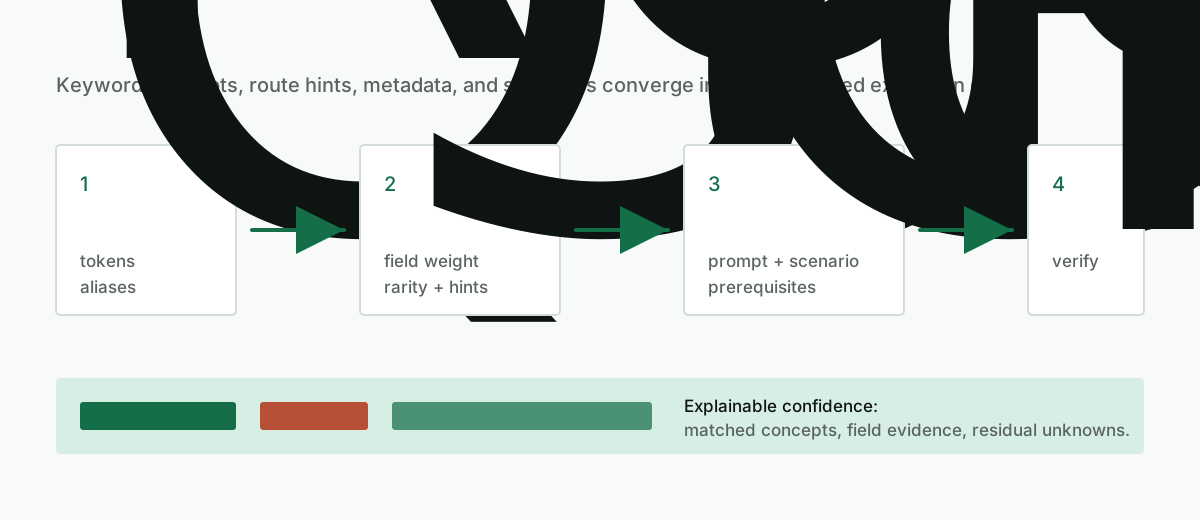
Small graph routing
Mission Directives keeps routing deterministic by resolving metadata before prompt bodies are loaded.